
The best AI video editors have completely revolutionized the traditional landscape of digital media post-production through neural network automation. By deploying these highly advanced software suites, modern production studios and independent digital creators can scale their publishing frequency exponentially without sacrificing cinematic fidelity.
- 5 Best High-Performance Web Hosting Platforms Reviewed (2026)
- Text to Video AI Tool Analysis: 13 Leading Engines Ranked by Free Value and Paid Power
- Best AI Voice Generator PC Tools: Local vs Cloud Engines Compared
- AI Voice Generator Realistic Architecture: How Modern Systems Mimic Human Emotion
- How to Download AI Video Generator Software: Step-by-Step 2026 Guide
These sophisticated algorithmic tools manage labor-intensive tasks such as rough-cut assemblies, semantic audio cleaning, and real-time motion tracking automatically. Transitioning from traditional, timeline-dragging edit suites to unified automated workspaces enables creators to construct high-velocity content channels.
CURRENT: Best AI Video Editors – 10 Advanced Multimedia Engines to Multiplied Content Output
Choosing the right automation engine requires evaluating specific algorithmic capabilities like synthetic voice cloning, multilingual dynamic captioning, and cloud-based collaborative pipelines. This detailed production-ready evaluation analyzes ten market-leading systems engineered to turn raw footage into optimized media assets.
The ultimate master index of the 10 best AI video editors
Finding the perfect platform means matching your specific production requirements with the correct algorithmic framework. The following index profiles the ten best AI video editors dominating the content creation market today.
- Descript: A pioneer in text-based video processing that lets you edit video tracks simply by deleting words from an automatically generated transcript.
- Runway Gen-3: A cutting-edge generative video powerhouse engineered to create stunning cinematic clips and transitions from simple textual descriptions.
- CapCut AI: A dominant short-form editing machine featuring extensive template libraries, automatic voiceovers, and intelligent auto-caption styles.
- Premiere Pro AI: An industry-standard non-linear editor supercharged with Adobe Sensei algorithms for smart audio ducking, text editing, and scene edits.
- InVideo AI: A comprehensive script-to-video generator that creates complete narrative outlines, voice clones, and b-roll selections from one text input.
- Synthesia: A specialized enterprise avatar generator that converts plain text documents into professional training videos using lifelike synthetic human presenters.
- HeyGen: A premier digital avatar platform focused on hyper-realistic voice cloning and natural physical translation behaviors for multinational marketing assets.
- Opus Clip: An intelligent short-form content curator that analyzes long horizontal recordings to extract and reframe highly engaging vertical social media clips.
- Veed.io: A cloud-based multimedia creation hub that simplifies background noise reduction, automated subtitling, and multi-track screen recording.
- Wondershare Filmora: A user-friendly editing desktop program packed with smart cutout brushes, audio stretchers, and rapid AI copywriting assistants.
Technical evaluation criteria for selecting advanced automated editing systems
READ MORE : Best AI Voice Generator PC Tools: Local vs Cloud Engines Compared
Selecting the best AI video editors for your daily pipeline requires checking key software performance benchmarks beyond basic marketing hype. A professional system must deliver consistent rendering speeds while protecting your core media storage assets.

- Transcription Accuracy: High-accuracy natural language processing models save hours of manual typing when generating dynamic subtitle overlays.
- Voice Clone Fidelity: Advanced synthetic speech generation must capture realistic human inflections without sounding robotic or metallic.
- Object Isolation Quality: Computer vision tracking systems should isolate complex moving subjects cleanly without introducing distracting edge artifacts.
When assessing the best AI video editors, check how well the software preserves structural video resolution during heavy file conversions. At Best AI Tools, we emphasize that real productivity gains depend entirely on finding stable, cloud-powered rendering architectures. Digital platforms that rely entirely on local device processing can slow down your entire desktop workflow during intense multitrack video exports.
Comprehensive pricing architecture across premium video automation software
Understanding the financial breakdown of your multimedia toolkit is crucial for managing your monthly production overhead effectively. The structured pricing overview below compares free tiers against professional subscription plans to help you make an informed decision.
| Software Name | Free Tier Offerings | Paid Subscription Plans | Primary Target User |
| Descript | 1 watermarked export per month | Pro plan with unlimited text-based editing | Podcasters and documentary editors |
| Runway Gen-3 | Limited generation credits | Pro tiers for high-resolution video exports | Visual artists and concept directors |
| CapCut AI | Basic filters and auto-cut access | Premium features with advanced cloud space | Short-form TikTok and Reel creators |
| Opus Clip | Low-resolution test exports | Paid packages for full auto-reframing batches | Social media agencies and clip managers |
| Synthesia | Single sample video creations | Corporate accounts for custom avatar builds | Corporate training and HR departments |
Evaluating these pricing brackets involves studying how much rendering power you actually get for your investment. Free options are great for quick personal tests, but they often add intrusive brand watermarks or limit your final file export quality. Moving to paid tiers for the best AI video editors unlocks multi-voice cloning, advanced timeline features, and massive cloud rendering pipelines built to handle heavy commercial workloads.
Streamlining post-production workflows with synthetic media layers
READ MORE : From Prompt to Export: Which AI Video Generator Free Tool Delivers the Best Raw Visual Quality?
Maximizing your publishing volume requires combining automated video cutting tools with artificial voice generators and intelligent background music tracking systems. The best AI video editors bundle these separate technological layers into a single dashboard to save you time.
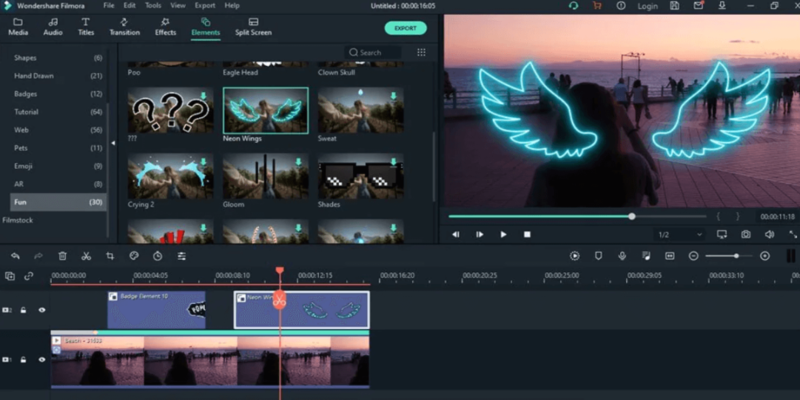
- Integrated Subtitle Generation: Auto-caption engines convert speech to text in seconds, automatically applying engaging visual styles that keep viewers watching.
- Synthetic Voice Overlays: Instantly change or update narrated scripts without setting up microphones or booking expensive voice actors.
- Algorithmic B-Roll Matching: Contextual analysis systems scan your script text to automatically insert relevant stock footage and thematic music tracks.
These multi-track optimization pipelines remove the classic creative bottlenecks that usually slow down post-production work. Utilizing the best AI video editors with integrated toolsets keeps your formatting consistent and helps you turn simple ideas into finished digital assets ready for instant distribution.
Securing sustainable creative scaling in modern media markets
Achieving long-term content growth requires moving away from slow, manual frame-by-frame cutting and embracing algorithmic workflow acceleration. Furthermore, integration with cloud deployment infrastructure allows distributed teams to collaborate instantly on large-scale file formats without latency. To truly dominate modern media channels, you must treat your editing software as an automated digital assembly line.
Consistently tracking platform rendering speeds, monitoring your cloud credit balances, and adjusting asset templates will help your team stay ahead of fast-moving platform trends. By investing in the best AI video editors and keeping your production pipeline agile, you can effortlessly turn simple scripts into premium, highly engaging multimedia assets that capture audience attention worldwide.
SOURCE: https://bestaitools.reviews
CATEGORY: AI Video